
Cursor - The Best AI-Powered Code Editor
FreemiumCursor is a VS Code fork rebuilt around AI-native code editing. Now at v3 with Composer 2 (in-house frontier model), cloud agents, MCP plugins, and agentic computer control.
Rated by our editorial criteria, not by paid placement.
Pricing, model access, and rights can change; verify final terms with the provider.
Outbound links may be affiliate links and do not affect the review verdict.
Tech Specs
Overview
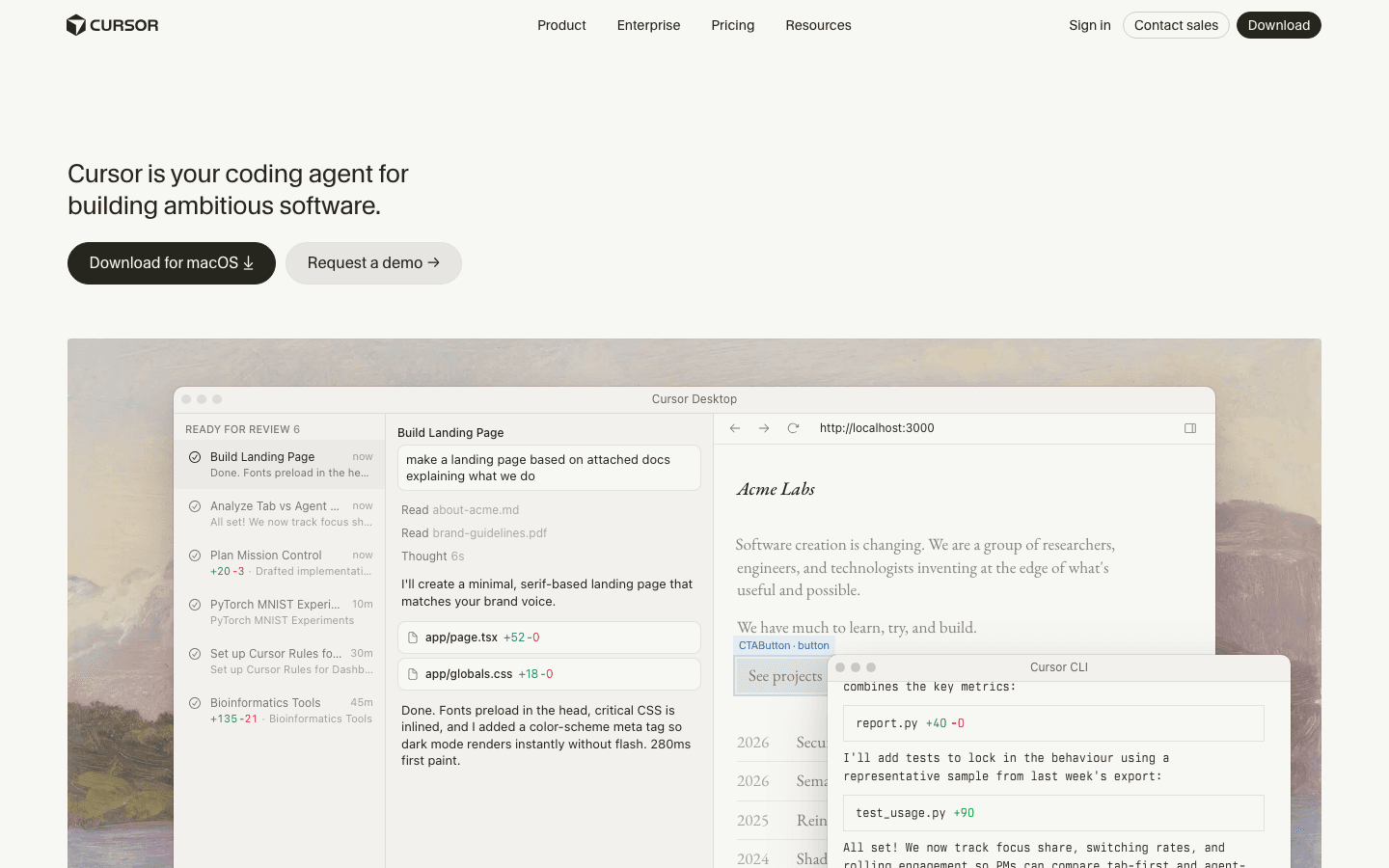
Cursor has evolved from a VS Code fork into a full agentic coding platform. Cursor 3 (April 2026) introduced a unified workspace with agent-first interface, cloud/local agent handoff, and built-in browser control. Composer 2 (March 2026), Cursor''s own in-house model fine-tuned from Kimi K2.5, delivers frontier-level coding performance at 1/7th the cost of previous generations.
Key Features
- Cursor 3 Workspace: Agent-first interface with IDE fallback — see what agents produce at a higher level, then dig into diffs and LSP
- Composer 2: In-house model scoring 61.3 on CursorBench, 73.7 on SWE-bench Multilingual. Priced at 2.50/M output
- Cloud + Local Agents: Start work in the cloud, seamlessly hand off to local for testing and editing
- Built-in Browser: Agents can open, navigate, and prompt against local websites for full-stack testing
- MCP Plugins: One-click install of community plugins extending agents with tools, skills, and subagents
- Computer Control: Cursor agents can take over your desktop to execute workflows across applications
Architecture & Model Specs
- Composer 2: Fine-tuned Kimi K2.5, 200k context window, optimized for long-horizon agentic coding
- Model Routing: Auto-selects between Composer 2, Claude Opus 4.7, GPT-5.5 based on task complexity
- Context: Multi-repo awareness with full codebase indexing
- Speed: Composer 2 Fast (default) at ~100+ tokens/sec; Standard at higher throughput
Pricing Breakdown
| Plan | Price | Features |
|---|---|---|
| Hobby | Free | 50 slow requests/mo, basic completions |
| Pro | $20/mo | $20 API credit, generous Composer 2 usage |
| Pro Plus | $60/mo | $70 API credit, higher Composer limits |
| Ultra | $200/mo | $400 API credit, maximum usage |
| Business | $40/user/mo | Admin controls, team marketplace |
Privacy & Safety
- Code Privacy: Code sent to model providers (configurable per-provider)
- Privacy Mode: Toggle to prevent code from being used for training
- Local Agents: Run entirely on your machine — zero code leaves your desktop
- Enterprise: SOC 2 compliance, data residency, SSO
The Killer Feature
Composer 2 + Cursor 3 Agents — Cursor''s own model at $0.50/M input is dramatically cheaper than routing to Claude or GPT, while scoring competitive on coding benchmarks. Combined with the agent-first workspace, you can describe a multi-file refactoring, let the cloud agent plan and execute it, then seamlessly continue locally to test and iterate. The MCP plugin marketplace means agents can integrate with your database, CI/CD, and deployment tools directly.
Visual Evaluation Checklist
For an AI editor, screenshots are not just decoration. They show whether the product makes the agent loop understandable enough to trust during real development.
| Interface area | Why it matters |
|---|---|
| Chat and agent panel | Shows how tasks are scoped and whether context is visible |
| Diff view | Determines how easily developers can reject or refine generated changes |
| Model selector | Reveals cost, speed, and quality trade-offs in daily work |
| Terminal/test panel | Confirms whether generated code can be validated without leaving the workspace |
| Team settings | Shows whether privacy, usage, and admin controls are practical |
Pros & Cons
Pros:
- Composer 2 offers frontier coding quality at fraction of the cost
- Cursor 3 agents handle complex multi-repo workflows
- Seamless cloud-to-local agent handoff
- Growing plugin ecosystem via MCP
Cons:
- Competing with Claude Code and OpenAI Codex directly
- Requires downloading a separate editor
- Token-based pricing on teams plans adds complexity
- Agentic features can be unpredictable on complex codebases
Best Use Cases
Cursor is strongest for developers who already spend their day inside an editor and want AI to operate across real project files. It is especially useful for refactors, component migrations, test generation, bug diagnosis and multi-file changes where autocomplete is not enough.
The key advantage is workflow continuity. You can ask for a change, inspect the diff, run the app, adjust the prompt and keep moving without switching tools. That makes Cursor more practical than a separate chatbot for day-to-day implementation work.
Where Cursor Needs Discipline
Agentic coding is powerful, but it can make broad changes quickly. Teams should review diffs carefully, run tests after generated changes and avoid giving agents vague tasks against sensitive areas of the codebase. A prompt like "clean up this repo" is risky. A prompt like "add loading and error states to this settings page without changing the API contract" is much safer.
Pricing also deserves attention. Cursor's value is strong for active developers, but teams should watch usage patterns. Heavy agent workflows, frontier model routing and multiple seats can make the monthly cost less predictable than a simple subscription.
Cursor vs Claude Code vs Copilot
Choose Cursor when you want an AI-native editor with strong repo awareness and a visible diff workflow. Choose Claude Code when terminal-native agent work and deep implementation planning matter more than editor UX. Choose Copilot when the team wants the least disruptive AI layer inside existing VS Code or GitHub workflows.
For many teams, Cursor becomes the daily driver for feature work while Claude Code is used for larger task planning, repo-wide changes or terminal-heavy workflows. The right answer depends on how much control developers want over the agent loop.
Verdict
Cursor 3 with Composer 2 is the most advanced AI coding platform available. The in-house model at aggressive pricing, combined with agent-first workflow and computer control, makes it worth the $20/month. If you''re a professional developer, the productivity gain pays for itself within days.